
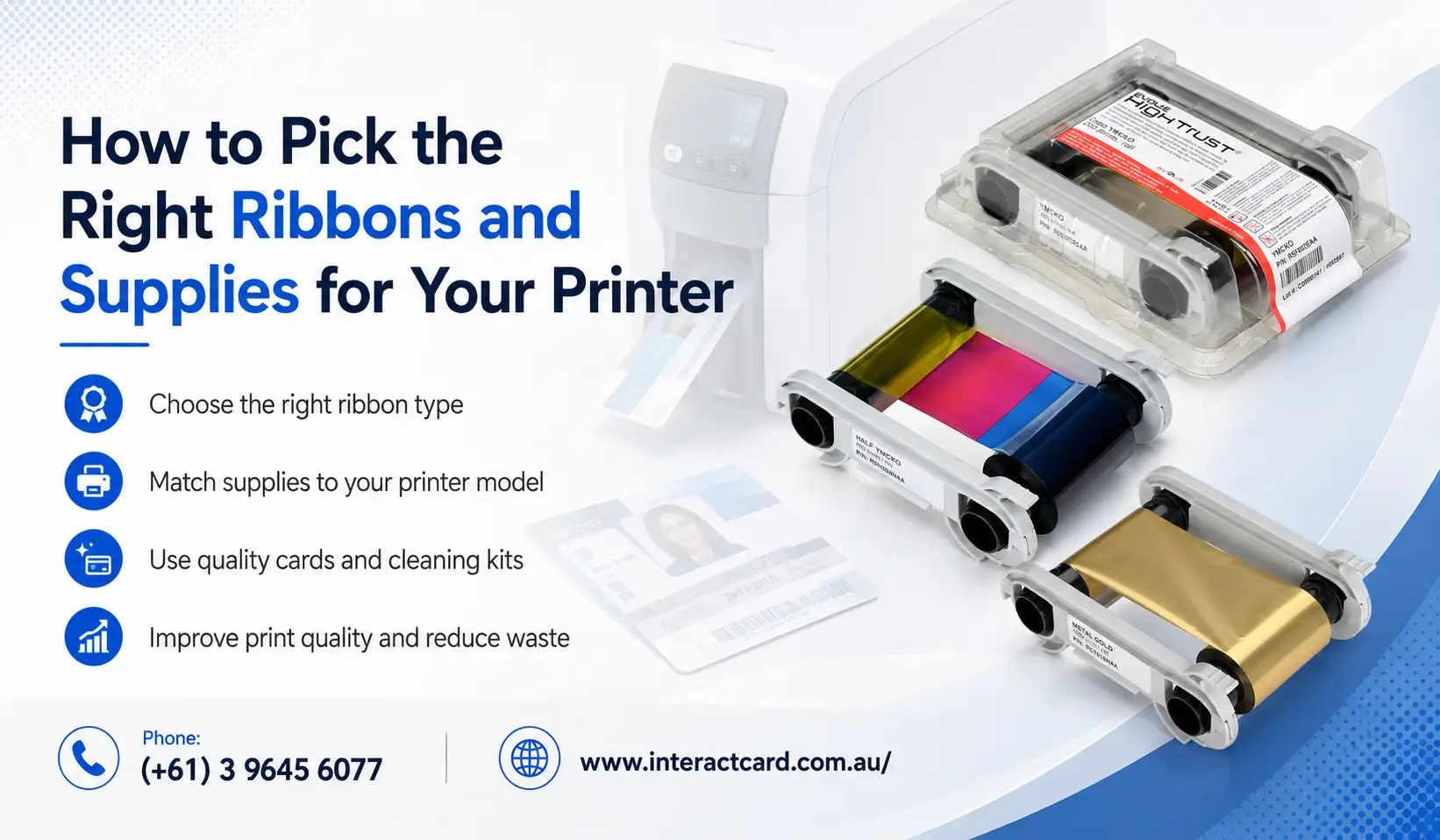
How to Pick the Right Ribbons and Supplies for Your Printer
Choosing the right ribbons and supplies for your printer is one of the most important steps in producing professional, durable, and high-quality plastic cards. Whether your organisation prints staff ID cards, student cards, visitor badges, membership cards, loyalty cards, or access control cards, the quality of your consumables directly affects the final result.
Many businesses focus only on buying the right id card printer, but the printer is only one part of the card printing process. The ribbon, blank cards, cleaning kits, and other supplies you use can make a major difference to print clarity, card lifespan, printer performance, and overall printing cost.
For Australian organisations that rely on daily or regular card production, selecting the right consumables helps reduce waste, avoid printer issues, and maintain a professional brand image. This guide explains how to choose the right ribbons and supplies for your printer, what options are available, and why working with a trusted supplier like InteractCard can help you get better results from your card printing setup.
Why Printer Ribbons and Supplies Matter
A card printer does not work like a standard office printer. Instead of paper and ink cartridges, most card printers use specialist ribbons and plastic card materials designed for direct-to-card or retransfer printing.
The ribbon acts as the ink source, transferring color, black text, overlays, or special effects onto the plastic card surface. If the wrong ribbon is used, the card may appear faded, patchy, misaligned, or unsuitable for daily use.
The right supplies help you achieve:
Sharp text and clear photos
Strong colour reproduction
Longer-lasting printed cards
Reduced printer errors
Better printhead protection
Lower card replacement costs
More consistent results across every batch
For businesses, schools, clubs, healthcare providers, government departments, and retail organisations, professional card quality is important. A poorly printed ID badge can look unprofessional and may affect security, customer trust, and staff presentation.
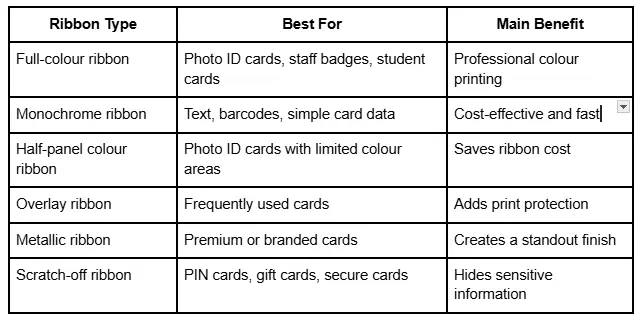
Common Ribbon Types and Their Best Uses
Choosing the Right Blank Cards
Ribbons are important, but blank cards are just as critical. Using poor-quality cards can cause print issues, card jams, uneven results, and damage to the printer.
Most card printers use standard CR80 plastic cards, which are the same size as a credit card. However, there are different types of cards available depending on the application.
PVC Cards
PVC cards are the most common choice for ID printing. They are suitable for staff ID cards, student cards, membership cards, and visitor badges.
PVC cards are popular because they are:
Durable
Smooth for printing
Professional in appearance
Suitable for colour and monochrome printing
Cost-effective for regular use
Magnetic Stripe Cards
Magnetic stripe cards are used when data needs to be stored on the card. These are common in access control, loyalty programs, hotel cards, and membership systems.
Contactless and Smart Cards
Some organisations require cards that work with access control systems or secure identification technology. Contactless and smart cards can include embedded chips or RFID technology.
These are commonly used by:
Corporate offices
Schools and universities
Government facilities
Healthcare organisations
Security-sensitive workplaces
Before choosing these cards, it is important to confirm compatibility with your printer and access system.
Adhesive Cards
Adhesive cards are useful when you need to apply printed information onto an existing access card or smart card. Instead of printing directly onto the technology card, you print on an adhesive-backed card and attach it to the original card.
Don’t Forget Cleaning Kits
Cleaning supplies are often overlooked, but they are essential for maintaining print quality and protecting your printer. Dust, card debris, and ribbon residue can build up inside the printer over time.
Regular cleaning helps prevent:
Card jams
Print lines
Faded areas
Ribbon errors
Printhead damage
Poor card feeding
If your organisation uses an identity card printer regularly, cleaning kits should be part of your standard consumable order. They are a small investment that can help extend printer life and reduce downtime.
How to Match Supplies to Your Printer Model
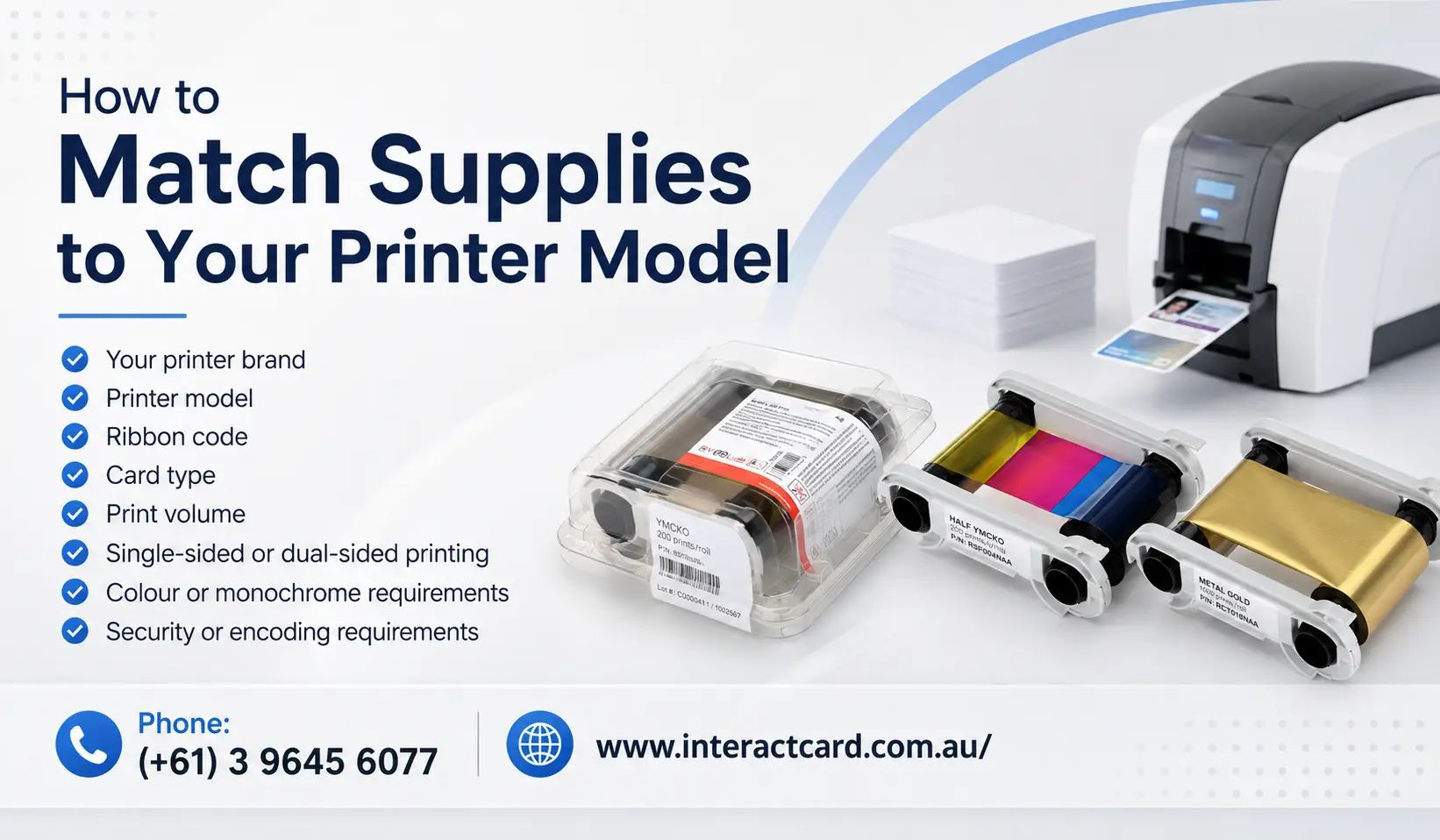
Not every ribbon works with every card printer. Each printer model has specific ribbon and consumable requirements. Using the wrong ribbon can cause errors or damage the machine.
Before placing an order, check:
Your printer brand
Printer model
Ribbon code
Card type
Print volume
Single-sided or dual-sided printing needs
Colour or monochrome printing requirements
Security or encoding requirements
For example, Evolis printers such as Zenius, Primacy, Primacy 2, Badgy, Avansia, and Agilia may require different ribbons and supplies. Choosing the correct option ensures smooth operation and consistent print quality.
This is where expert supplier support becomes valuable. Instead of guessing, businesses can speak with InteractCard to choose ribbons and supplies that match their exact printer model and card printing needs.
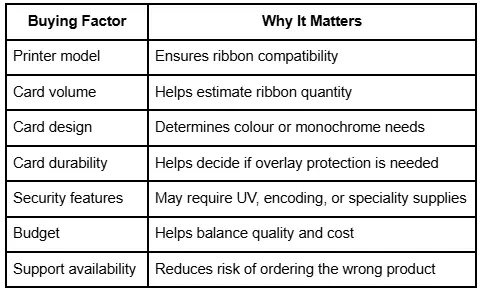
What to Consider Before Buying Consumables
Why Cheap Consumables Can Cost More Over Time
It may be tempting to buy the cheapest ribbons or cards available online. However, low-quality or incompatible consumables can lead to hidden costs.
Cheap supplies may cause:
Poor print results
More rejected cards
Printer errors
Increased cleaning needs
Shorter printhead life
More downtime
Unprofessional card presentation
For organisations printing ID cards in-house, reliability matters. A low-cost ribbon is not a saving if it creates waste, delays, or damage to the printer.
High-quality consumables are designed to work properly with your printer, protect internal components, and deliver consistent results. This is especially important for Australian organisations that depend on card printing for daily operations, security, and identification.
InteractCard: Helping Australian Organisations Print Better Cards
InteractCard supplies and supports plastic ID card printing solutions across Australia, including Melbourne, Sydney, Brisbane, Perth, Adelaide, Darwin, Hobart, and regional areas. The company focuses on helping organisations choose the right card printers, ribbons, blank cards, and support services for their specific needs.
Whether you need an entry-level badge printer, a professional id card printer, or a complete in-house card printing solution, InteractCard can help you select the right setup.
InteractCard offers solutions for many industries, including:
Education
Retail
Government
Healthcare
Aged care
Clubs and memberships
Security
Corporate offices
Banking
Mining
Training organisations
Events and visitor management
Their product and service range includes Evolis card printers, printer ribbons, blank cards, cleaning kits, card design software, remote support, and expert guidance for organisations of different sizes.
Benefits of Choosing InteractCard
Choosing the right supplier is just as important as choosing the right printer. InteractCard provides more than products; they provide practical advice and ongoing support.
Key advantages include:
Specialist knowledge in plastic card printing
Support for Evolis printer solutions
Ribbon and consumable guidance
Printer setup and support services
Solutions for small, medium, and large card volumes
Australia-wide service support
Options for schools, businesses, clubs, and government organisations
Help choosing the right consumables for your exact printer model
For businesses that are new to card printing, InteractCard can help simplify the process. For organisations already printing cards, they can help improve print quality, reduce errors, and choose more suitable supplies.
Practical Tips for Ordering Ribbons and Supplies
To avoid mistakes when ordering consumables, follow a simple checklist.
Before ordering, confirm:
Your printer model name
Whether your printer is single-sided or dual-sided
How many cards you print per month
Whether you need colour, black, or speciality printing
Whether cards need overlays or extra durability
Whether cards require magnetic stripe, chip, or access control compatibility
Whether your printer needs cleaning supplies
It is also smart to keep spare ribbons and cleaning kits in stock. Running out of supplies can interrupt card issuing, especially during busy periods such as student enrolment, staff onboarding, event registration, or membership renewal campaigns.
Best Ribbon Choice by Card Type
Staff ID Cards
For staff ID cards, full-colour ribbons are usually recommended because they allow you to print names, photos, logos, job titles, and branding. If cards are used daily, choose ribbons with overlay protection.
Student ID Cards
Student cards often require photos, names, student numbers, barcodes, and sometimes access control features. Full-colour or half-panel ribbons may be suitable depending on the design.
Visitor Badges
Visitor badges may be printed in monochrome or colour depending on how professional or temporary they need to be. For high-volume visitor printing, monochrome ribbons can be a cost-effective choice.
Membership and Loyalty Cards
Retailers, clubs, and gyms often use colour ribbons to create branded membership or loyalty cards. Metallic or speciality ribbons may be used for premium card designs.
Access Control Cards
Access cards may require careful card selection, especially if they include magnetic stripes, RFID, or smart chip technology. Always confirm compatibility before printing.
Final Thoughts
Choosing the right ribbons and supplies for your printer is essential for producing professional, durable, and reliable plastic cards. The right consumables improve print quality, protect your printer, reduce waste, and help your organisation maintain a strong professional image.
Whether you are using an id card printer for staff badges, a printer for id card printing in a school office, or an identity card printer for secure access cards, your supplies should match your printer model, card design, and daily printing needs.
For Australian organisations looking for trusted card printing products and expert support, InteractCard offers a reliable range of Evolis printers, ribbons, cards, cleaning kits, and technical assistance. With the right advice and the right consumables, your business can print high-quality cards in-house with confidence.
To explore suitable card printers, ribbons, and consumables, visit InteractCard and choose a card printing solution that fits your organisation’s needs.
News

Secure Payments
This website uses an SSL certificate
to protect you while online
Cards We accept
We accept the above Credit Cards
including ZipPay

SHIPPING
Orders placed before 2pm EST
Business days are shipped
the same day.
Industry Experts
Plastic ID Card Printer Expertise
for small to large businesses